

Salary work for 100+ employees needs more than a formula. HR and finance teams must collect clean employee data, close attendance and leave records, confirm salary changes, check deductions, review tax details, approve the final salary sheet, and keep payslips ready after payment.
One missed update can disturb the full monthly pay cycle. A pending leave request, wrong bank details, missed exit, unapproved deduction, or outdated payroll setting can create salary errors that take days to correct.
A clear payroll process helps large teams reduce last-minute confusion. When HR, managers, and Finance follow fixed deadlines and review steps every month, payroll becomes easier to check, approve, and release with fewer errors.
Table of Contents
- Why Payroll Gets Risky After 100 Employees
- Step-by-Step Payroll Process for 100+ Employees
- Set a Payroll Calendar Before the Month Ends
- Get Payroll Data Ready Before Calculation
- Check active employees, new joiners, and exits.
- Review attendance, shifts, overtime, and leave.
- Confirm salary changes and one-time payments.s
- Check advances, loans, and recovery amounts.
- Verify bank, PAN, and tax-related details.
- Check Nepal-Specific Payroll Details Before Approval
- Use a Maker-Checker Payroll Approval Flow
- Review the Final Salary Sheet by Exceptions First
- Complete Post-Payroll Work Properly
- Share payslips on time
- Use one clear process for salary questions.
- Keep correction records
- Prepare finance records
- Payroll Error Checklist for 100+ Employee Teams
Why Payroll Gets Risky After 100 Employees
Payroll becomes harder after 100 employees because every month brings more exceptions. A larger team means more new joiners, exits, missed punches, shift changes, salary revisions, advances, reimbursements, unpaid leave, and manager approvals.
The main risk is not always the payroll formula. The main risk is wrong input data. If HR and Finance start with incomplete records, the final salary sheet will carry those mistakes into payment, payslips, reports, and employee queries.
A 100+ employee company often deals with:
New employees who join in the middle of a pay cycle
Resigned employees who need salary hold, final settlement, or notice-period adjustment
Leave requests still waiting for manager approval
Missed biometric punches, manual attendance edits, or shift exceptions
Salary increments, role changes, allowances, arrears, or bonuses
Advance salary, loans, EMI recovery, or one-time deductions
Department-wise approval delays before payroll cut-off
Tax, contribution, and finance-report checks before salary release
Employee questions after payment because payslip details are unclear
Small teams may manage some exceptions from memory. A larger team needs a repeatable workflow because memory is not a payroll system. Painfully obvious, but payroll mistakes usually wait until payment day to announce themselves.
Step-by-Step Payroll Process for 100+ Employees
A large payroll cycle needs a clear order. HR should not calculate salary before attendance, leave, salary changes, bank details, and deductions are ready. Please do not release payment until exception checks and approvals are complete.
Use this flow as the monthly payroll process:
1. Set payroll cut-off dates and communicate them to HR, managers, and Finance.
2. Confirm active employees, new joiners, exits, and employees on salary hold.
3. Close attendance, missed punches, shift changes, overtime, and unpaid absence records.
4. Approve or reject pending leave requests before salary calculation.
5. Review salary revisions, allowances, bonuses, arrears, reimbursements, advances, and deductions.
6. Check bank details, PAN records, tax category, and contribution setup.
7. Generate the draft salary sheet and compare exceptions with the previous month.
8. Send department or manager-level payroll summaries for review where needed.
9. Run HR and finance checks on net salary, deductions, tax, and total payable amount.
Get final approval, release salary, share payslips, and save payroll records.
Set a Payroll Calendar Before the Month Ends
A payroll calendar gives every payroll input a deadline. Without clear cut-off dates, HR keeps receiving late changes after Finance has already started calculation, and the salary sheet turns into a moving target.
Set the calendar at the start of each fiscal year or payroll cycle. Share it with department heads, managers, HR, and Finance. Once a cut-off passes, late changes should need written approval before they enter the current salary cycle.
Task | Owner | Recommended Deadline |
Attendance cut-off | HR | 25th of the month |
Leave approval deadline | Managers and HR | 26th of the month |
Salary change deadline | HR | 26th of the month |
Advance and deduction cut-off | Finance | 27th of the month |
Department review | Managers | 27th of the month |
Final salary review | HR and Finance | 28th of the month |
Salary release | Finance | 1st of next month |
Payslip release | HR or Finance | Within 2 days of payment |
These dates can change based on company policy and pay cycle. The important point is simple: every input needs an owner and deadline. HR and Finance should not accept new salary inputs during final review unless the change has written approval.
Get Payroll Data Ready Before Calculation
Salary calculation should start only after HR and Finance confirm the main payroll inputs. Clean input data helps teams avoid wrong salaries, repeated corrections, and employee complaints after payment.
For 100+ employees, HR should not wait until the last day to check records. Large teams need an early review of employee status, attendance, leave, salary changes, advances, and deductions.
Check active employees, new joiners, and exits.
The active employee list changes every month in a growing company. A new employee may need prorated pay, while a resigned employee may need a salary hold, notice-period adjustment, asset clearance, or final settlement.
HR should confirm joining dates, last working dates, department, designation, salary structure, bank details, PAN records, and employee status before payroll starts.
Review attendance, shifts, overtime, and leave.
Attendance and leave records directly affect paid days, unpaid days, overtime, and net salary. Missed punches, late marks, half days, shift changes, overtime requests, and manual attendance edits can all change the final amount.
HR should close attendance before Finance starts the calculation. Managers should approve or reject leave requests on time, so Finance does not guess whether an absence is paid, unpaid, or still pending.
Confirm salary changes and one-time payments.s
Salary revisions, promotions, allowances, bonuses, arrears, incentives, and reimbursements should have clear approval before Finance includes them. Casual messages should not become salary instructions.
HR should separate regular salary components from one-time payments. Clear separation helps Finance understand why an employee's net salary changed from the previous month.
Check advances, loans, and recovery amounts.
Advance salary and EMI recovery need careful review. Please have Finance check the approved amount, repayment plan, remaining balance, deduction month, and any hold or waiver before finalizing salary.
This step helps prevent double deductions, missed recoveries, and awkward salary questions after payment. Nobody enjoys the"why is my salary less?" conversation, especially HR.
Verify bank, PAN, and tax-related details.
Wrong bank details delay payment and create follow-up work. Missing PAN details or incorrect tax-related records can also affect payroll reports and filing records.
HR should verify bank details for new employees and employees who recently changed accounts. Finance should check tax-related records before preparing filing-ready salary data.
Check Nepal-Specific Payroll Details Before Approval
Payroll in Nepal needs more than gross salary minus deductions. HR and Finance may need to review income tax slabs, PAN details, PF, CIT, SSF, eTDS records, salary sheets, bank transfer files, payslips, advances, and company-specific salary rules before approval.
Old spreadsheet formulas can create problems when tax rules, employee categories, or contribution settings change. Larger teams need a safer review process because one wrong setup can affect many payslips at once.
Before salary release, Finance should check:
Employee tax category and PAN details
Taxable earnings and approved deductions
PF, CIT, SSF, or other contribution setup based on company policy and applicable rules
Monthly tax deduction and year-to-date tax records
Salary sheet totals and department-wise cost
eTDS-related records and finance export requirements
Payslip format and employee-facing salary details
PF, CIT, SSF, and eTDS should not be treated as a simple last-minute checklist. Each item affects payroll records differently, so HR and Finance should review the setup based on current rules, employee records, and company policy. When rules are unclear, check official sources or consult a qualified tax or compliance professional before finalizing payroll.
Use a Maker-Checker Payroll Approval Flow
Payroll for 100+ employees should not depend on one person from start to finish. HR, managers, Finance, and authorized approvers should review the parts they understand best.
A maker-checker process catches errors before payment. It also gives the company a written trail when questions come later.
Review Stage | Owner | What to Check |
Employee data review | HR | New joiners, exits, salary changes, bank details, PAN records |
Attendance and leave review | HR and managers | Missed punches, unpaid leave, overtime, shifts, manual edits |
Salary calculation review | Finance | Earnings, deductions, tax, contribution setup, net salary |
Exception review | HR and finance head | Holds, advances, large net changes, final settlement, one-time payments |
Final approval | Authorised approver | Total payable, bank file, release approval |
Payment confirmation | Finance | Bank transfer status, payment proof, salary records |
One person can miss details because one person cannot know every attendance issue, department exception, salary change, and finance rule. A review flow gives the team better control without making payroll unnecessarily slow.
Verbal approval should not be enough for salary changes, deductions, holds, or corrections. HR and Finance should keep written records for every important payroll change.
Review the Final Salary Sheet by Exceptions First
A final salary sheet review should focus on exceptions first. A row-by-row scan of 100+ employees may look careful, but it often misses the records most likely to contain errors.
HR and Finance should check the following records before approving payment:
Employees with salary changes or new salary components
New joiners, resigned employees, and employees on hold
Staff with unpaid leave, half days, late adjustments, or unusual absence patterns
Employees with missed punches, manual attendance edits, or overtime changes
Advance salary, loan, and EMI recovery cases
One-time bonuses, arrears, reimbursements, or allowances
Payslips on hold or released after correction
Large net salary changes from the previous month
Department-wise salary totals and total payable amount
Finance should compare the current salary sheet with the previous month. Sudden changes in net salary, total deductions, employee count, department cost, or total payable amount should have a clear reason.
After final approval, lock the salary sheet. Any correction after approval should go through a separate correction record instead of silent edits.
Complete Post-Payroll Work Properly
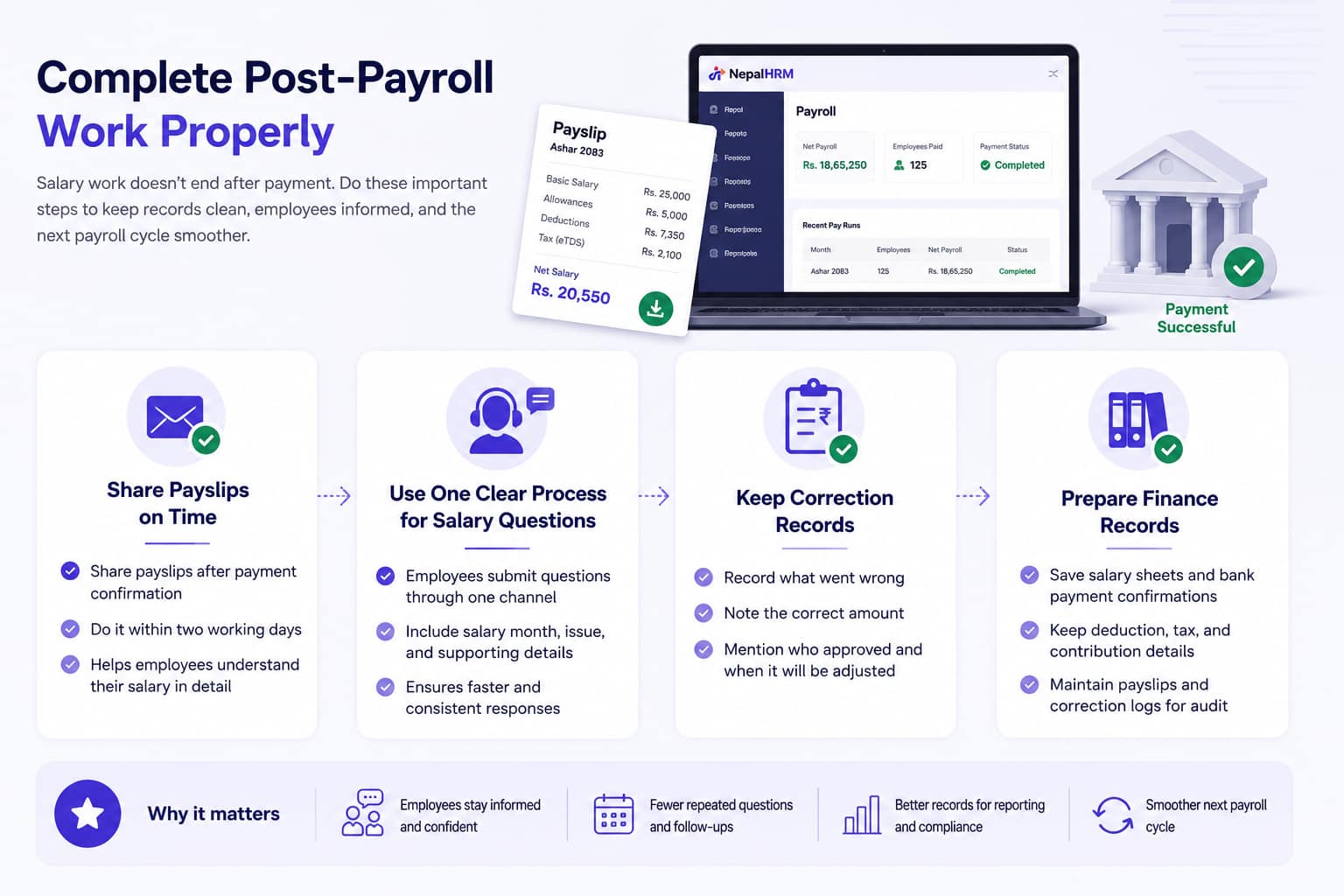
Salary work does not end after payment. HR and Finance still need to share payslips, answer employee questions, record corrections, save bank confirmations, and prepare finance documents.
Post-payroll work helps the next salary cycle start cleaner. It also reduces repeated confusion from employees and managers.
Share payslips on time
Payslips help employees understand earnings, deductions, tax, contribution details, and net salary. HR or Finance should share payslips after payment confirmation, ideally within two working days.
Use one clear process for salary questions.
Please do not send salary questions via random calls, WhatsApp messages, desk visits, or side quests disguised as "please check once". Use one process where the employee submits the salary month, issue, supporting details, and expected correction.
Keep correction records
Some issues may need adjustment in the next cycle. HR and Finance should record what went wrong, the correct amount, who approved the correction, and when the adjustment will apply.
Prepare finance records
Finance should keep salary sheets, payment confirmations, deduction summaries, contribution details, advance recovery records, bank transfer reports, payslips, and correction logs for review and reporting.
Payroll Error Checklist for 100+ Employee Teams
Use this checklist before salary release. A checklist cannot fix a weak process by itself, but it helps HR and Finance catch common issues before payment.
Area | Pre-Release Checklist |
Employee data | Confirm active employee list |
Attendance and leave | Close attendance cut-off |
Salary and deductions | Approve salary changes |
Review and release | Review exception list |
Conclusion
Payroll for 100+ employees in Nepal needs a clear process, not last-minute fixes. HR and finance teams should confirm employee data, close attendance and leave records, review salary changes, check deductions, follow approval steps, and keep payslips and finance records ready before the cycle ends.
NepalHRM helps Nepali companies manage this work in one connected system. With employee records, attendance, leave, salary structures, payslips, and Finance reports in one place, HR and finance teams can reduce manual work and run the monthly salary process with better control. Sign up for NepalHRM for free!


