The Smarter Way to Manage Employees in Nepal
Scattered spreadsheets, email threads and physical files are not an employee management system. NepalHRM gives HR one clean place for profiles, org chart, access control and payroll data.
- No credit card
- Set up in one day
- Free onboarding
What is employee management software?
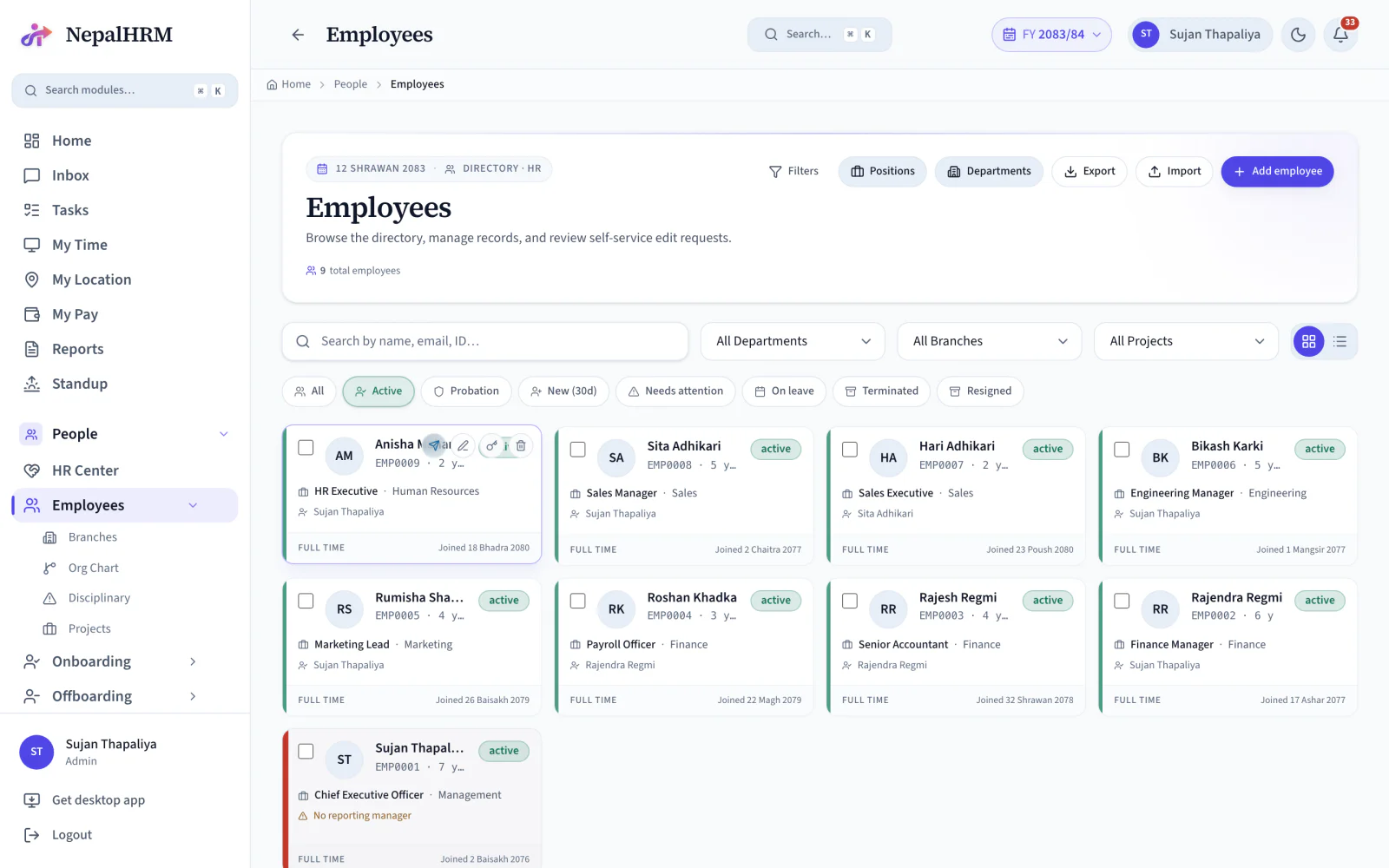
Employee management software keeps one authoritative record per person so every other HR process reads the same facts. In NepalHRM that record holds personal details, work information, documents, attendance, payroll data, assigned assets and history, under role-based permissions that decide who sees which part of it. An employee is created once, and leave, payroll, attendance and appraisal all read that one profile rather than their own copy of it.
- Each profile carries 15 tabs, from About through to Bonus Points.
- Six access roles run from employee to admin, with permissions set per module.
- The org chart renders four ways: as a tree, a grid, a list, or grouped by department.
- Joining dates and records are held in both Bikram Sambat and Gregorian.
- Because every module reads this one record, correcting a bank account or a joining date is a single edit.
Last updated · Reviewed by Rajendra Regmi, Co-founder
One record per employee, and every module reads from it
- 15 Tabs
- Per employee profile, from About to Bonus Points
- 6 Roles
- Employee to admin, with per-module permissions
- 4 Views
- Org chart as tree, grid, list or by department
- BS + AD
- Joining dates and records in both calendars
Managing People Should Not Feel Like This
Most HR teams manage employees across disconnected tools. Salary in a spreadsheet, documents in a folder, the org chart in a slide deck nobody has opened since the last reorganisation.
- Salary in Excel, bank details in email, documents in a shared folder
- No access control, so sensitive pay data has no protection and no audit trail
- The org chart is a slide that goes stale the day someone changes team
- HR spends half the day answering "send my payslip" and "what is my leave balance"
One System Becomes the Source of Truth
A role-controlled employee record holding personal details, work info, documents, attendance, payroll data, assets and history, in one profile every other module reads.
What NepalHRM gives you
- Complete employee profiles, so nothing lives in somebody's inbox
- The right level of access for HR, managers and employees, per module
- A live org chart built from the reporting manager field, not maintained by hand
- Self-service, so employees answer their own questions instead of messaging HR
Everything for Managing Employees in NepalHRM
Profiles, departments, positions, reporting lines, documents, access roles and company records in one place, searchable and secure.
Employee Profile
Contact details, job information, bank details, emergency contacts, PAN, PF and SSF in one record with 15 tabs.
Bulk Employee Import
Import a whole team from CSV instead of creating profiles one at a time.
Organization Chart
Tree, grid, list and by-department views, built from the reporting manager on each profile.
Reporting Manager Setup
One field drives the org chart, approval routing and what a manager can see about their team.
Department & Position Setup
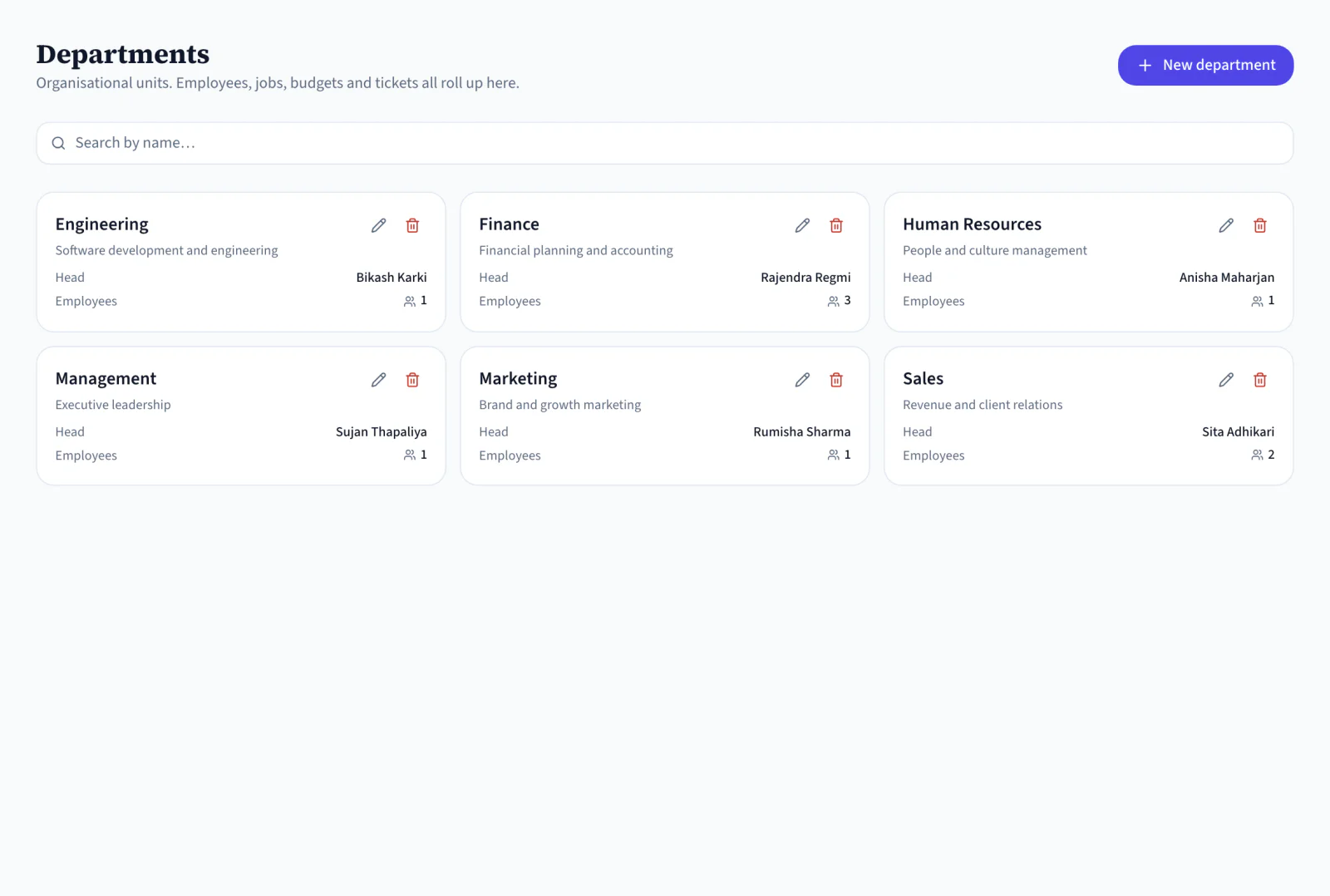
Departments, job positions and branches, so every profile connects to a real team, role and office.
Role-Based Access Control
Six roles from employee to admin, with per-module permissions over who can view, edit and approve.
Multi-Company Management
Run several companies from one login while keeping each company's employee data separate.
Employee Self-Service
Employees view payslips, request leave, update details and upload documents without asking HR.
Salary Range Guard
A warning when a salary entry falls outside the approved band, before a costly typo is saved.
Salary History & Audit
Every pay change logged with the old and new amount, who changed it and when.
Employee Documents
Request, collect and track citizenship, PAN and contracts from the profile instead of chasing email.
Search & Advanced Filters
Find people by name, department, branch, role, employment type, status or hire-date range.
One Profile, From Offer Letter to Final Settlement
The same record follows a person through the company, which is why the history on it is worth having.
- Day 1
Created
Added by hand or imported from CSV, connected to a department, position, branch and manager.
- Every day
Used
Attendance, leave, payroll, assets and performance all read the same profile.
- On change
Logged
Promotions, transfers and pay changes are written to the profile's history, not over it.
- Last day
Closed
Resignation, exit tasks and final settlement close the record without deleting what it holds.
Move People Data Off Spreadsheets Without Losing Control of It
A spreadsheet cannot enforce who sees a salary, and it cannot tell you who changed one. An employee management system does both by default.
Spreadsheets & Folders
- Employee data spread across files, inboxes and drives
- Everyone with the file can read every salary
- The org chart is a slide, updated when somebody remembers
- HR answers the same questions by message, all day
Set Up the Structure, Then Run HR From It
Build the company structure first and every profile after it lands in the right place. Then the daily work is approvals, not data entry.
- Departments, positions and branches before employees, so every profile connects to the right team, role and office from the start.
- Create profiles one at a time for new hires, or import an existing team from CSV, then review the self-service edit requests that follow.
- Point each employee at their manager and the organization chart builds itself, in tree, grid, list or department view.
- Switch the same data to a department view when you need headcount and reporting lines per team rather than the whole tree.
- Fifteen tabs per employee, from About and Work Info to Payroll, Assets, Documents and Bonus Points, with a read-only View As for checking what an employee sees.
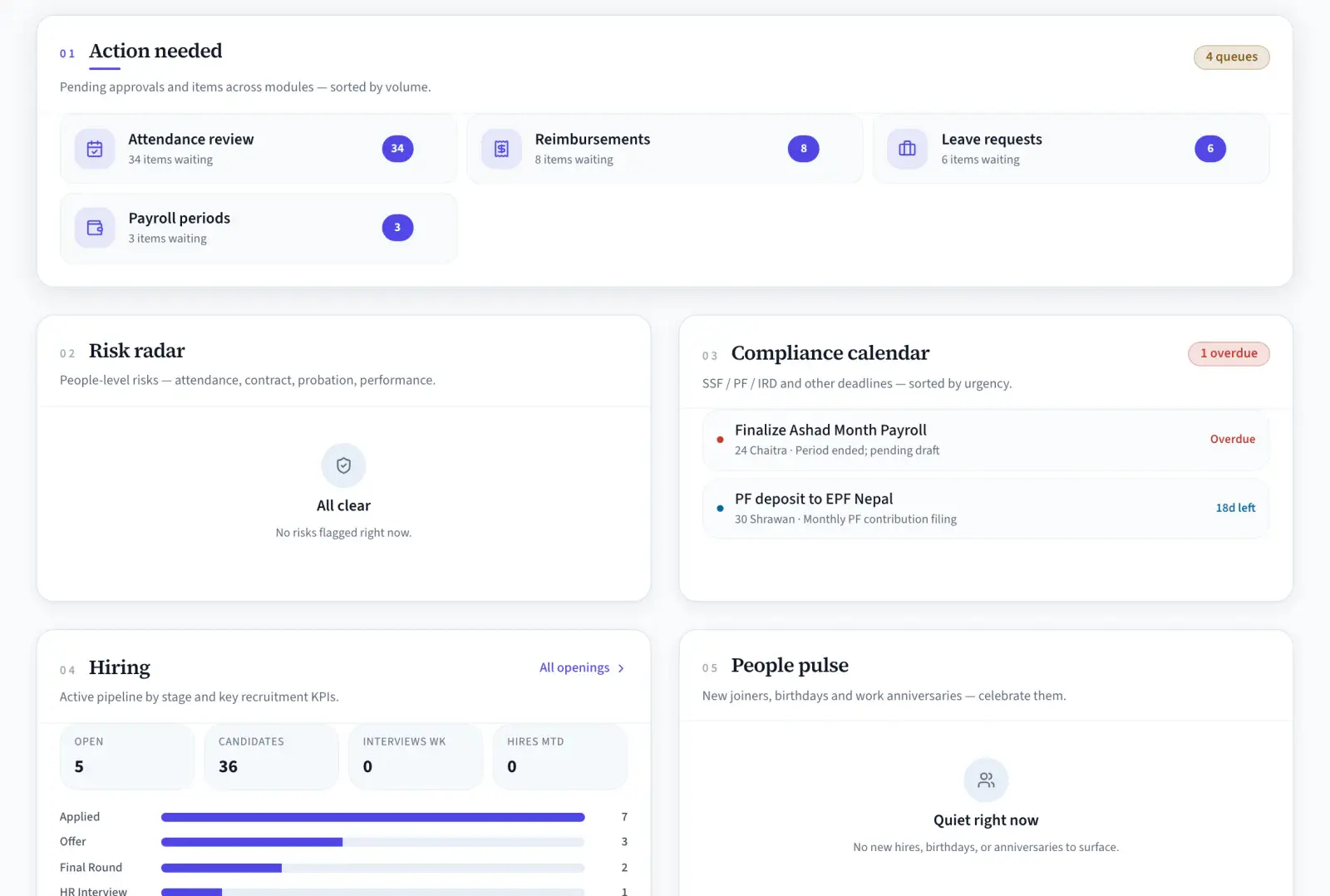
- Headcount, payroll, attendance review, reimbursements and leave requests, sorted by how many items are waiting on you.
- Every request with its leave type, dates, days, reason and remaining balance, approved or rejected in one place.
- Overtime requests carry their date, hours, category and rate, and move through team-leader and HR review.
- Shifts and rosters on one side, resignation requests with their last working date and approval status on the other.
Departments and Positions
What Needs You Today
How to Set Up Your Organization in NepalHRM
A step-by-step walkthrough of first-time setup in NepalHRM: adding your organization's details, configuring the company profile, and completing the base configuration an administrator needs before employees are added and day-to-day HR runs.
What the video shows
- Adding your organization's details for the first time
- Configuring the company profile
- Completing the base setup required before employees are added
16:07 · narrated in Nepali · watch on YouTube
One Directory, a Different View for Everyone
The same record, filtered by what each person is allowed and needs to see.
For HR
Every record, in one place
- Profiles, documents, departments and reporting lines from one directory
- Bulk import for a new company, edit requests for everything after
- Salary range guard and an audit trail on every pay change
For Managers
Your team, and only your team
- Direct reports resolved from the reporting manager field
- Leave, overtime and attendance approvals routed to you automatically
- Team structure visible without asking HR for a chart
For Employees
Your own record, self-served
- Payslips, leave balance and documents without messaging HR
- Update your own details and submit them for review
- The same profile on web, Android and iOS
Built for Every Business That Manages Employees in Nepal
From a five-person startup to a group of companies on one login, the record works the same way.
The Record at the Centre of a Human Resource Management System
One employee profile, read by every other module. That connection is what makes a set of HR tools a human resource management system rather than six products that happen to share a login.
Payroll Software
Salary, bank details and PAN live on the profile, so payroll pulls them instead of asking for them again.
Attendance & Biometric
Biometric device PINs map to employee profiles, so every punch attaches to the right person.
Leave Management
Leave balances and approval routing both come from the profile and its reporting manager.
Recruitment & ATS
Hire a candidate and NepalHRM creates their employee profile, with no duplicate data entry.
Performance Management
Objectives and reviews are assigned to employees, and bonus points show on the profile's own tab.
Asset Management
Assigned laptops and phones appear on the employee's Assets tab and come back on the way out.
Employee Management is one module of the all-in-one HR software for Nepal, so an employee is created once and every module above reads the same record.
Simple, Transparent Pricing
No Hidden Fees
NepalHRM gives you enterprise-grade HR software at a price built for Nepali businesses of every size.
- All core HR modules
- Nepal payroll compliance
- PF, SSF, CIT & eTDS
- Biometric integration
- Free onboarding support
- Regular feature updates
- Multi-company support
- BS + AD calendar
Free trial available, no card required · No setup fees · Cancel anytime
Access NepalHRM from the Web, Android and iOS
HR manages records from the desk, managers approve from mobile, and employees reach their own HR details anytime.
Frequently Asked Questions
Everything you need to know about employee management in NepalHRM before you get started.
A human resource management system is one system holding the employee record and every process that reads from it: profiles and org structure, attendance and leave, payroll and statutory deductions, recruitment, performance and assets. The test is not the module list, it is whether a change in one place reaches the others without being retyped.
Four things a generic system does not do out of the box: Bikram Sambat dates and a Shrawan to Ashad fiscal year, PF, SSF, CIT and TDS assessed on basic salary rather than gross, leave entitlements as the Labour Act 2074 defines them, and biometric attendance from the devices Nepali offices actually run. Everything else is standard HR software.
In practice the terms are used interchangeably in Nepal. Where a distinction is drawn, HRIS describes the record-keeping core (employees, documents, org structure) and HRMS describes that core plus the operational modules built on it, such as payroll, attendance and performance. NepalHRM is the second.
Employee management software stores, manages and updates employee information in one system: profiles, departments, reporting lines, documents, access roles and HR records, instead of spreading them across spreadsheets, folders and inboxes.
Because scattered records cost time and control. A single system means HR finds an employee's data in seconds, sensitive pay data is restricted by role, reporting lines stay current, and every other HR process reads from the same profile.
Fifteen tabs per employee: About, Work Info, Education, Nominees, Family, Control Center, History, Attendance, Leave, Overtime, Payroll, Finance Profile, Assets, Documents and Bonus Points.
Yes. The chart is generated from the reporting manager on each profile and can be read as a tree, a grid, a list or by department, then downloaded when leadership or a department head wants a copy.
Access is controlled by role. NepalHRM ships six roles (employee, team leader, manager, accountant, HR and admin) with per-module permissions, so pay data is visible only to the people you allow, and every change to it is logged.
Yes, through the self-service portal. Employees view their profile, upload documents, submit changes and raise requests, and HR reviews the edit requests before they are published to the record.
Yes. Bulk import takes a CSV of names, employee IDs, departments, positions, contacts and joining dates, so an existing team moves in without creating each profile by hand.
Yes. Joining dates, records and timelines are available in Bikram Sambat and English, so an HR team can work in the calendar it actually uses.
Employee record terms, defined
What a personnel record has to carry in Nepal, and the systems that carry it.
- Employment Typesरोजगारीका प्रकारNepal's Labour Act 2074 recognises five employment types: regular, work-based, time-bound, casual and part-time. The type decides how the contract can end, what entitlements apply, and what has to be in writing.
- Probation Periodपरीक्षणकालProbation is the initial period during which an employer assesses a new employee before confirming them. Nepal's Labour Act 2074 caps it at six months, after which the employee is confirmed or the engagement ends.
- Employee Self-Service (ESS)Employee self-service lets staff handle their own routine HR tasks: view a payslip, check a leave balance, apply for leave, update their details. It removes the queue of small requests that otherwise lands on HR.
- HRISAn HRIS, or human resource information system, is the system of record for employee data: profiles, contracts, documents, reporting lines and history. It stores and reports; an HRMS adds the workflows on top.
- Attrition RateAttrition rate is the proportion of employees who leave over a period, usually expressed annually. It is calculated as leavers divided by average headcount for the period, times one hundred.
All HR and payroll terms used in Nepal are defined in the glossary, each with the Act or rate it comes from.
Employee records, by sector
What a record has to hold, and who is allowed to read it, is set by the sector's own reporting obligation more than by HR preference.
- NGOs & INGOsProjects as a first-class dimension beside department and branch, with fixed-term contracts swept to Expired on their end date.
- Banks & financeMulti-branch records under role-based access, with an audit log over every field an approver can change.
- Schools & collegesTeaching and non-teaching staff on separate structures, held in one directory across campuses.
All eight sector setups are on the HR and payroll software by industry hub, each one a configuration of the same platform rather than a different product.
Stop Managing People Across Six Different Files
Join hundreds of Nepali businesses running their employee records, payroll and attendance on one system. Set up in a day, with free onboarding.
- No credit card
- Free onboarding
- Set up in one day
- Cancel anytime