Best Time & Attendance Software in Nepal
Let your employees clock in and clock out from the web or from ZKTeco and Hikvision biometric devices, review punch logs, catch late arrivals, and approve the day before payroll runs.
- ZKTeco & Hikvision
- BS + AD calendar
- Payroll-ready data
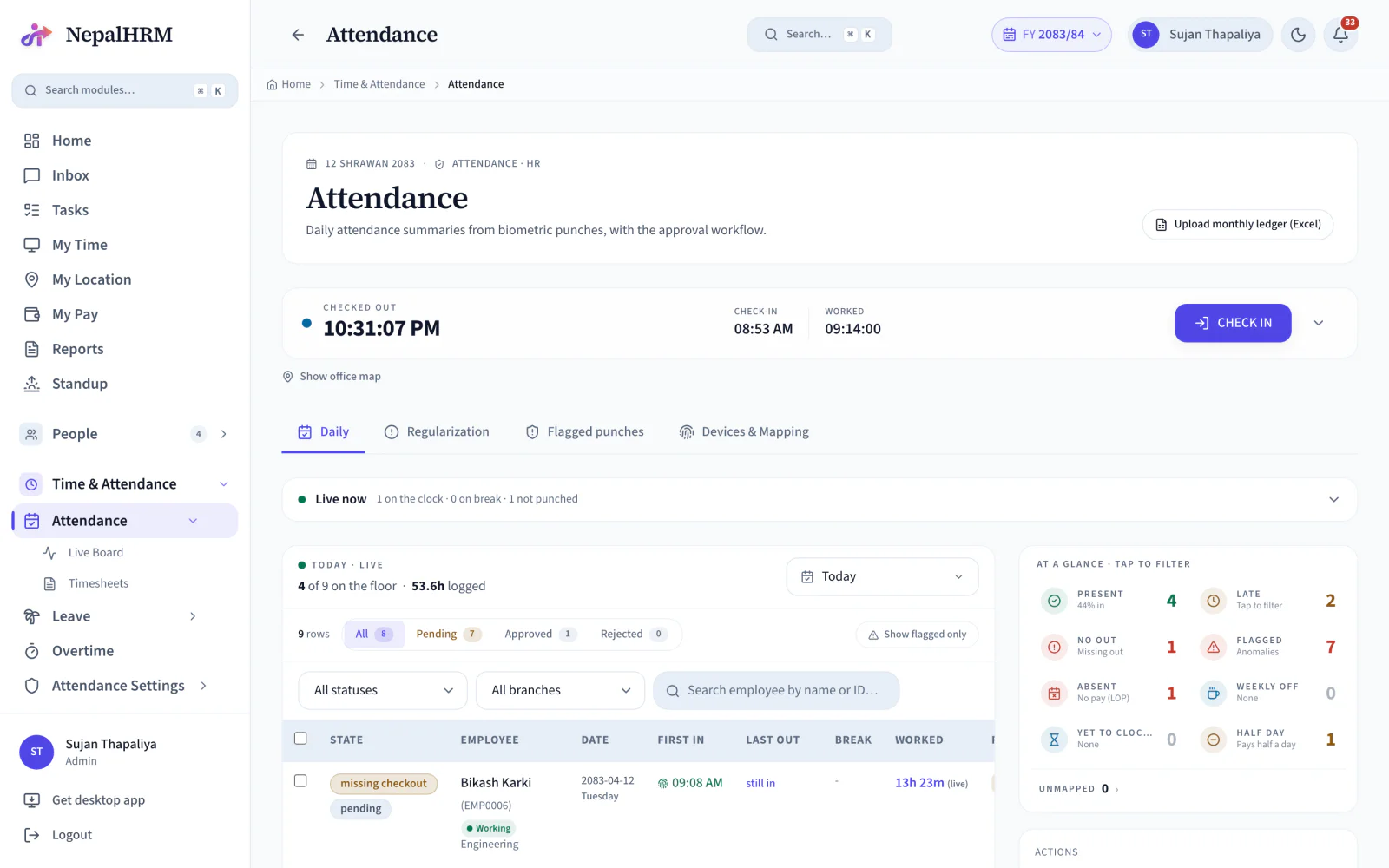
How does attendance management software work in Nepal?
Attendance software collects every punch, applies your company's policy to it, and hands payroll a set of approved days it can pay. NepalHRM ingests punches from biometric devices, applies the rules for late marks, half days and missing checkouts, and then surfaces only the days that actually need a human decision. The rest never reaches anyone's desk, which is the difference between reviewing exceptions and reviewing everything.
- ZKTeco and Hikvision devices sync punches into one attendance record per employee.
- The live board refreshes every 30 seconds, so who is in today is a glance rather than a question.
- Dates carry Bikram Sambat and Gregorian together, because a Nepali payroll month is not a calendar month.
- Approved attendance days feed the payroll draft directly, so nobody retypes them into a spreadsheet.
- Late marks, half days and missing checkouts are policy settings, not judgements remade by hand every month.
Last updated · Reviewed by Rajendra Regmi, Co-founder
From the punch at the door to the day payroll can pay
- ZK + HK
- ZKTeco and Hikvision ready
- Real-time
- Live board, refreshed every 30 seconds
- BS / AD
- Nepali and English dates side by side
- Payroll
- Approved days feed the payroll draft
The Device Records the Time. HR Records Everything Else
A biometric machine captures a punch and stops there. Turning a month of punches into a payable attendance sheet is still manual work, and it lands in the same week as payroll.
- Device data exported to Excel, then cleaned by hand every month
- Late arrivals and half-days counted manually against a written policy
- Missed punches chased over the phone with no record of the correction
- Finance waits on HR, and nobody can show how a figure was reached
Punches In, Approved Attendance Out
NepalHRM ingests every punch, applies your policy to it, surfaces only the days that need a human, and hands payroll a set of approved records.
What NepalHRM gives you
- ZKTeco and Hikvision devices sync punches into one attendance record
- Policy applies grace, late rules, half-days and weekly offs automatically
- Exceptions raise themselves: late, missing out, short day, flagged punch
- Employees request corrections, HR approves, and the day is rebuilt from the punches
Everything for Attendance and Biometric Management
Device data, employee mappings, approval status, alerts and exports live in one place, from the punch to the payroll-ready record.
Employee Clock In / Clock Out
First in, last out, break time, worked hours and the day status, on web or from the device.
ZKTeco Integration
Connect ZKTeco devices by serial and sync their attendance events into NepalHRM.
Hikvision Integration
Add Hikvision devices and manage their status, events and employee mappings from the same board.
Biometric Punch Log
Every raw event with its device, PIN, timestamp and direction, filterable by date, device and employee.
Device-to-Employee Mapping
Map each device PIN to an employee profile so every punch reaches the right record.
Late Arrival Alerts
Late arrivals, missing outs, half-days and short days are flagged the moment the day is rebuilt.
Daily Attendance Dashboard
Present, late, no-out, absent, flagged, weekly off and worked hours, each one a filter.
Regularization Requests
Employees submit the times they actually worked, and HR approves or rejects with a note on the record.
Attendance Summary Matrix
A full month per employee with P, ABS, HD, SO, PL and leave markers, plus an attendance percentage.
Recompute From Punches
Rebuild any day's summary from the raw events, so a corrected punch produces a corrected day.
Excel, PDF and CSV Export
Export the day or the month for HR review, finance, or a department head who wants their own copy.
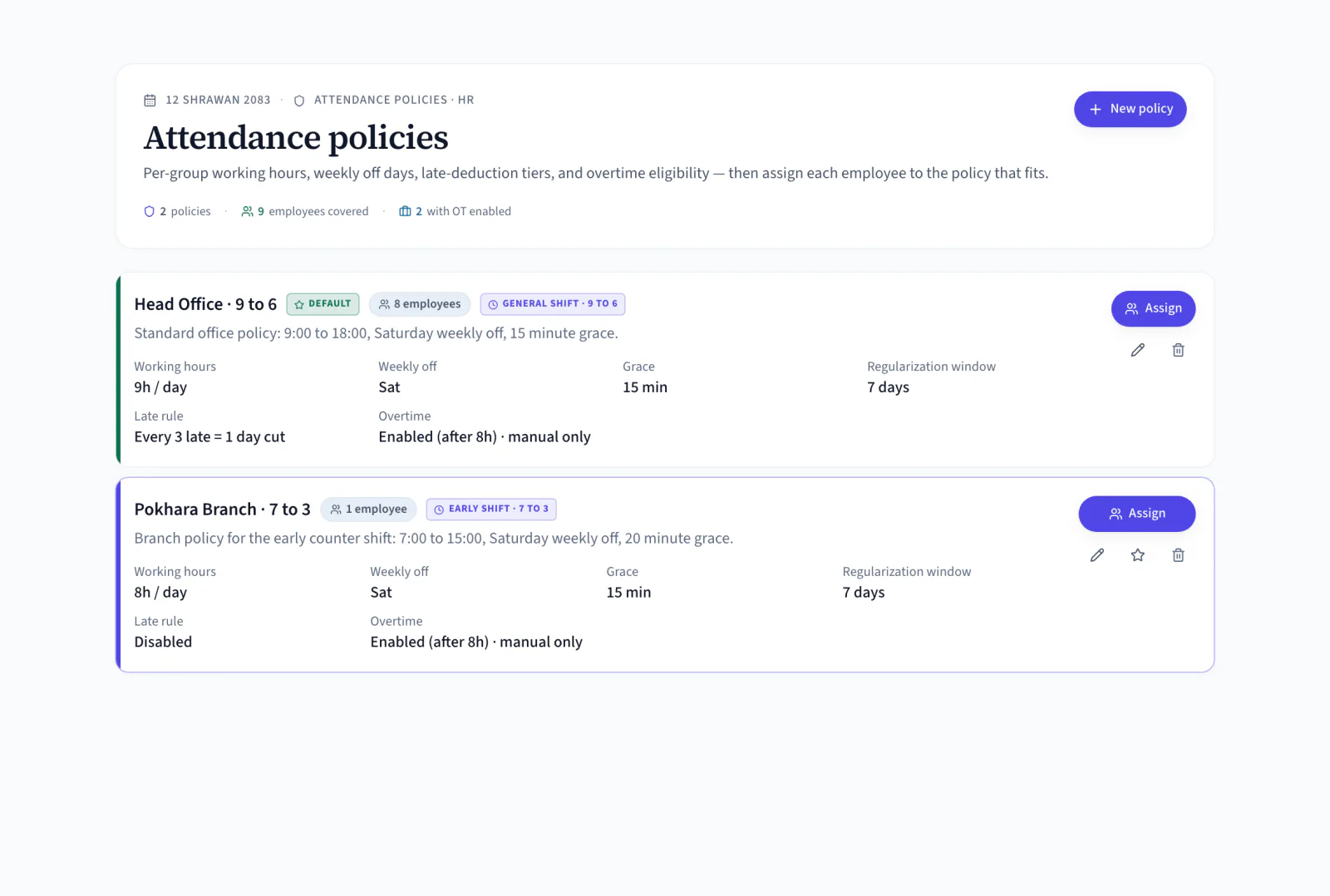
Attendance Policies
Working hours, weekly off days, grace minutes, late-deduction tiers and overtime eligibility, per group.
From Raw Punches to Payroll-Ready Records
Four states every attendance day moves through. The board tracks all four, so nothing reaches payroll unreviewed.
- 09:04 AM
Captured
The punch arrives from a ZKTeco or Hikvision device, or from the web clock-in.
- Rules applied
Computed
Grace, shift, weekly off and half-day thresholds turn the punches into a day status.
- Needs attention
Flagged
Late, missing checkout and short days surface in their own counters for HR to work through.
- Month end
Approved
HR approves the reviewed days and payroll reads present days, absences and payable days from them.
Move Attendance Off the Register Without Losing the Detail
Attendance is not a spreadsheet problem. It is a policy that has to be applied the same way to every employee, every day, and be provable afterwards.
Manual Attendance Work
- HR checks registers or sheets by hand
- Device data exported and cleaned in Excel
- Late days and deductions counted manually
- Finance waits for HR to finish the month
Set Up Once, Then Work the Exceptions
Devices and mappings are a one-time job. After that the day-to-day is reviewing what the system flagged.
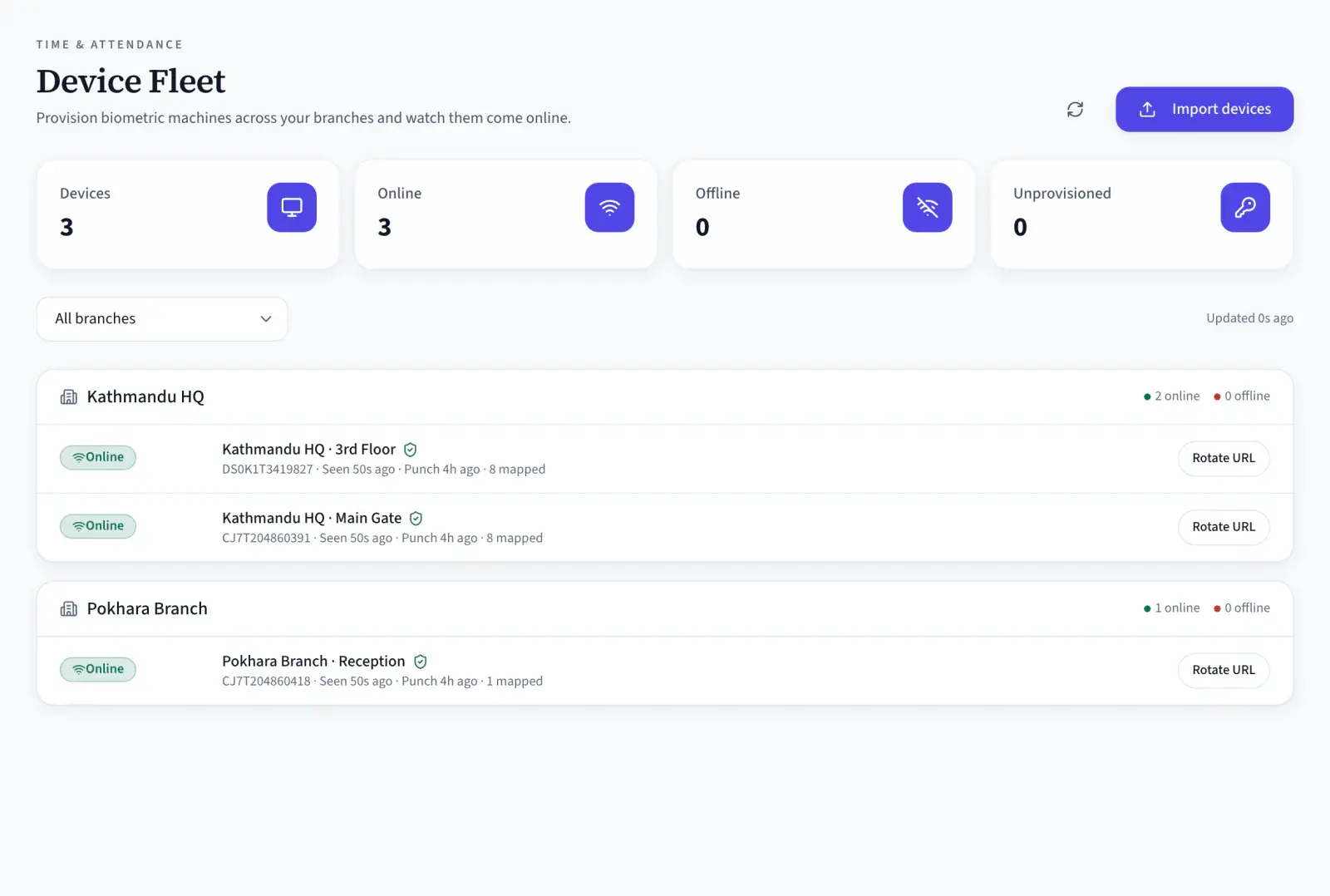
- Create each ZKTeco or Hikvision device with its vendor, model, IP, port, serial and timezone, then watch the branch come online.
- Connect each device PIN to an employee profile, by hand or with auto-map by name, so punches attach to the right person.
- Punches arrive by ADMS push or device sync, and the raw event log keeps the device, PIN, time and direction of every one.
- Work the pending queue, recompute a day from its punches if a correction lands, then approve and export for payroll.
- Define daily working hours, weekly off days, grace minutes, late-deduction tiers and overtime eligibility, then assign employees to the policy that fits.
- Staff clock in and out from the web when your company allows it, and the live board shows who is on the clock, on break, on leave or checked out.
- A forgotten punch becomes a regularization request with the times the employee actually worked, and HR approves or rejects it on the record.
- Present days, absences, half-days, weekly offs, holidays and approved leave for every employee, in one grid with an attendance percentage per person.
One Board for Every Branch
Rules Before Records
One Attendance Record, Read Three Different Ways
Employees see their own day, managers see their team, and payroll sees a month it can pay from.
For Employees
Your day, without asking HR
- Clock in and out from the web or the device at the door
- See your own first in, last out and worked hours as they happen
- Raise a regularization request when a punch is missed
For HR
Only the days that need you
- Counters for late, missing out, absent and flagged, each one a filter
- Approve, reject or recompute a day straight from the list
- Punch logs and mappings when a record needs to be traced back
For Payroll
A month that is ready to pay
- Present days, absences, half-days and unpaid leave per employee
- Late deductions applied by policy, not by memory
- Approved attendance, so the salary sheet is not an argument
Attendance Built for Every Business in Nepal
Factory gates, branch counters, hospital rosters and office floors all run on the same punch, policy and approval.
Attendance Connects Every Module
Attendance is the input half the HR system depends on. It sits next to all of them.
Payroll Software
Approved days, absences, half-days and late marks become payable days on the salary sheet.
Leave Management
Approved leave owns the day, so a leave day is never counted as an absence.
Shift & Overtime
Shift start, grace and weekly off drive lateness, and hours past the threshold become overtime.
Employee Management
Device PINs map to employee profiles, so every punch lands on the right record.
Activity Tracker
For desk teams, tracked work hours sit beside the punch record instead of replacing it.
Mobile App
Clock in from the field, approve a regularization from the road, check the board from anywhere.
Attendance is one module of the all-in-one HR software for Nepal, so an employee is created once and every module above reads the same record.
Simple, Transparent Pricing
No Hidden Fees
NepalHRM gives you enterprise-grade HR software at a price built for Nepali businesses of every size.
- All core HR modules
- Nepal payroll compliance
- PF, SSF, CIT & eTDS
- Biometric integration
- Free onboarding support
- Regular feature updates
- Multi-company support
- BS + AD calendar
Free trial available, no card required · No setup fees · Cancel anytime
Access NepalHRM from the Web, Android and iOS
HR works the queue from the desk, managers approve from mobile, and employees check their own attendance whenever they want.
Frequently Asked Questions
Everything you need to know about attendance in NepalHRM before you get started.
Attendance management software tracks employee clock-in and clock-out, working hours, late arrivals, absences, missing punches and attendance reports from one system, so the month does not have to be reconstructed from a register at payroll time.
Yes. Add the device with its vendor, model, IP, port and serial number, map its user IDs to employee profiles, and punches sync into NepalHRM as attendance events that become daily records.
Yes. Hikvision devices are added the same way as ZKTeco ones, with their own status, event stream and employee mappings on the same device board.
It connects the user ID (PIN) on a biometric device with the right employee profile in NepalHRM, so every punch belongs to the correct person. Mappings can be made one at a time, auto-matched by name, or imported in bulk.
Yes. Lateness comes from the attendance policy: shift start, grace minutes and working-hour rules. Late days appear in their own counter, and HR reviews them before they reach payroll.
The day is marked missing checkout and appears in the no-out counter. The employee raises a regularization request with the times they actually worked, and HR approves it with a note, after which the day is rebuilt.
Yes. Approved attendance supplies present days, absences, half-days, late marks, unpaid leave and payable days to payroll, so the salary sheet is built from reviewed records rather than a separate spreadsheet.
Yes, when your company allows browser-based attendance. NepalHRM records the time, updates the day status and keeps the activity on the live board alongside device punches.
Attendance terms, defined
The vocabulary a punch log is read with, from the device that records it to the metric HR reports on.
- Working Hoursकामको समयNepal's Labour Act 2074 sets working hours at eight a day and forty-eight a week, with at least one day of rest each week. Time worked beyond that is overtime and carries the higher rate.
- Biometric Attendanceबायोमेट्रिक हाजिरीBiometric attendance records a punch using a physical identifier such as a fingerprint or a face, on a device at the workplace. Because the identifier cannot be handed to a colleague, it removes buddy punching, which is the main weakness of card and register systems.
- GPS AttendanceGPS attendance records a check-in from an employee's phone along with their location, usually constrained to a defined area. It covers field staff, site engineers and branch teams who are nowhere near a biometric device.
- Attendance RegularisationAttendance regularisation is the process for correcting an attendance record: a missed punch, a forgotten check-out, a day spent at a client site. The employee raises it, a manager approves it, and the corrected record carries an audit trail.
- Shift Rosterपालो तालिकाA shift roster is the published schedule of who works which shift on which day. It is what attendance is measured against: without a roster, a punch at 14:00 cannot be classified as on time or late.
- Absenteeism RateAbsenteeism rate measures unplanned absence: days lost to unscheduled absence divided by the days that should have been worked, expressed as a percentage. Planned leave is excluded, because it is not the thing being measured.
All HR and payroll terms used in Nepal are defined in the glossary, each with the Act or rate it comes from.
Attendance, by sector
A punch is a punch. Where it is allowed to come from, and who may approve it, is the part that differs from one sector to the next.
- Retail & tradingEvery outlet is a branch with its own devices, and an attendance approval grant can be scoped to a single store.
- IT & softwareOffice locations with a radius held between 25 m and 2,000 m plus a Wi-Fi SSID list, and personal home-working locations.
- Manufacturing & constructionGate biometrics that keep collecting through a dropped plant link and sync the backlog when it returns.
All eight sector setups are on the HR and payroll software by industry hub, each one a configuration of the same platform rather than a different product.
Turn Every Punch Into Payroll-Ready Attendance
Join hundreds of Nepali businesses running attendance, leave and payroll on one system. Your HR team should be reviewing exceptions, not rebuilding a month in Excel.
- No credit card
- Free onboarding
- Set up in one day
- Cancel anytime