Goals People See, Reviews People Trust
Set objectives with targets and due dates, track progress through the period, run five types of performance review, and schedule 1:1 meetings with a clear agenda. Goals, reviews and meetings stay together on one page.
- No credit card
- Quick set up
- Free onboarding
What is performance management software?
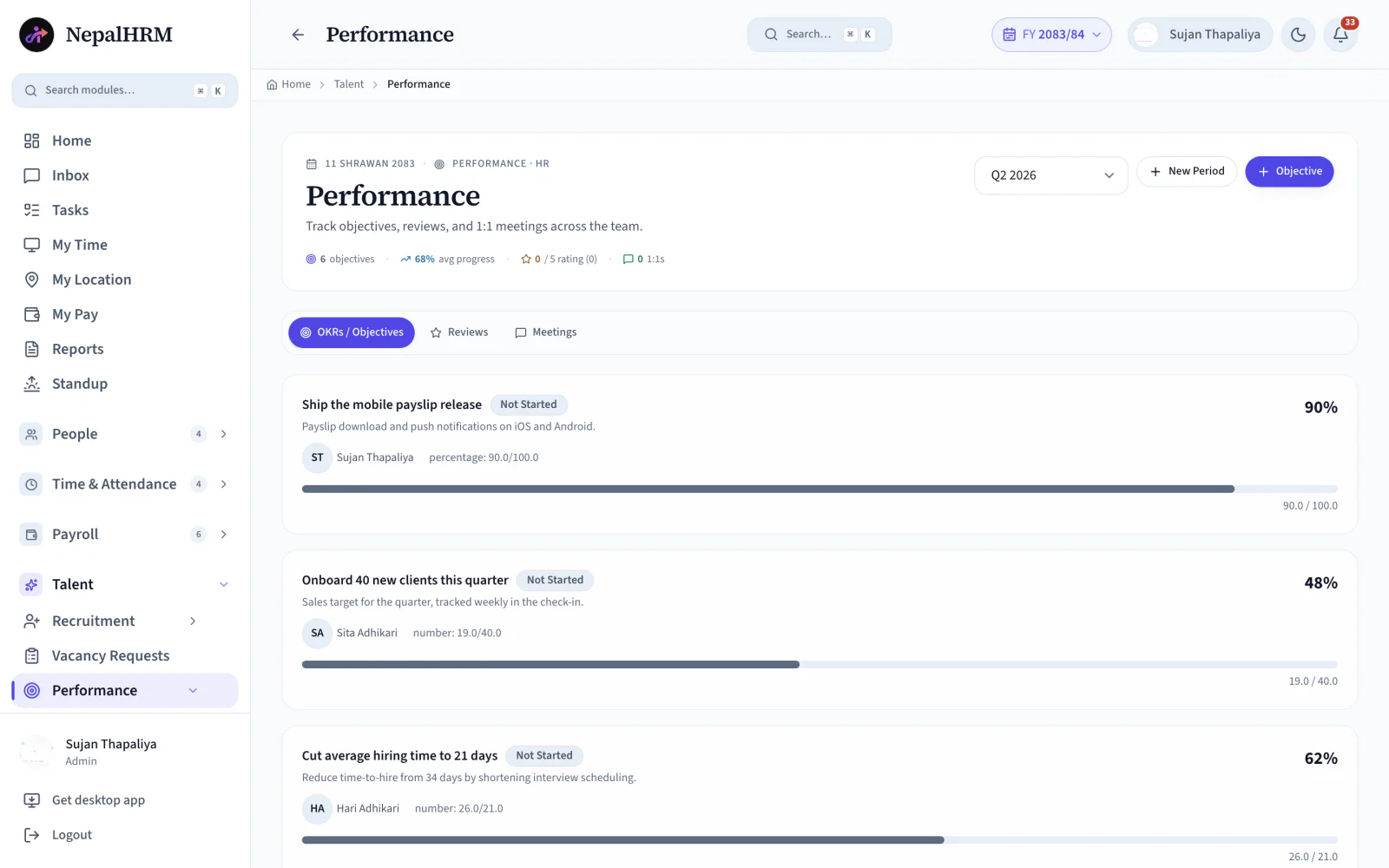
Performance management software keeps goals, reviews and one-to-ones for the same period in one place, so a rating has something behind it. NepalHRM organises everything by review period: objectives carry a target value, a key result type, a due date and an assignee; reviews carry a rating and a status; and every scheduled one-to-one keeps its time and agenda beside them rather than in a separate calendar.
- Objectives, reviews and 1:1s sit on three tabs of one page.
- Goal completion updates by dragging a slider, so progress is current rather than reported.
- Five review types are supported: quarterly, annual, probation, self and 360°.
- Ratings run 1 to 5 stars and keep a full history per employee.
- Because reviews sit on the same employee record as attendance, leave and tasks, a rating is written beside the period it describes rather than reconstructed at year end.
Last updated · Reviewed by Rajendra Regmi, Co-founder
From goals to reviews, every performance step stays connected
- 3 Tabs
- Objectives, reviews and 1:1s on one page
- Live %
- Drag the slider to update goal completion
- 5 Types
- Quarterly, annual, probation, self and 360°
- 1–5 ★
- Ratings with a full history per employee
Goals in January, Panic in December
When goals sit in a forgotten document and reviews depend on memory, employees lose direction and ratings become hard to trust.
- Objectives written once a year, then never looked at again
- Reviews based on the last two weeks, not the whole period
- 1:1s cancelled, undocumented, or reduced to a status update
- Probation and intern reviews slip past their deadline unnoticed
Objectives, Reviews and 1:1s on One Page
Performance is organised by period. Objectives carry live progress, reviews include ratings and status, and every scheduled meeting keeps its time and agenda.
What NepalHRM gives you
- Objectives with target value, key result type, due date and assignee, grouped by period
- A progress bar on every objective: drag the slider and the team average updates instantly
- Reviews rated 1 to 5 stars with a status trail: draft, submitted, acknowledged
- 1:1s, check-ins, goal-setting and feedback meetings scheduled with employee, time and agenda
Everything From the First Objective to the Final Rating
Track employee goals, run structured reviews, and keep every performance conversation on the record inside NepalHRM.
OKRs & Objectives
Objectives like “Increase revenue by 20%” with a key result type, target value, due date and assignee.
In-Place Progress
Every objective shows a progress bar. Drag the slider to update completion right on the page.
Performance Periods
Create quarterly, half-yearly or annual periods with + New Period. Objectives and reviews stay tied to the period they belong to.
Team Averages
The header rolls up objective count, average progress, average rating and 1:1s for the selected period.
1–5 Star Reviews
Rate performance on a five-star scale and add comments for the selected review period.
Five Review Types
Quarterly, annual, probation, self-review and 360°. Pick the type that fits the moment.
Review Status Trail
Every review moves draft → submitted → acknowledged, so there is a clear record of when it was prepared, shared and seen.
1:1 Meetings
Schedule a 1:1 with employee, date, time and an agenda, straight from the Meetings tab.
Check-Ins & Feedback
Beyond 1:1s: check-ins, goal-setting sessions and feedback meetings, each with its own type.
Meeting Records
Every meeting keeps its scheduled time, agenda and status, so the thread never breaks between sessions.
AD / BS Dates
Due dates picked in Gregorian (AD) or Bikram Sambat (BS), matching how your company actually plans.
Probation Alerts
Intern and probation review alerts surface on the HR dashboard before the deadline slips past.
A Steady Rhythm, Not a Year-End Scramble
Set the period, track objectives through it, talk every week, and close with a review that reflects the whole story.
- Start of period
Set Objectives
Create the performance period and assign objectives with targets, due dates and responsible employees.
- Every week
Talk & Track
Hold scheduled 1:1s and check-ins, then update progress as the work moves forward.
- End of period
Review & Rate
Complete quarterly, annual, probation, self or 360° reviews on a 1 to 5 star rating.
- Always
Acknowledge & Grow
Reviews move from draft to submitted to acknowledged, leaving a complete record for the period.
Move Reviews Away From Memory Without Losing Honesty
A good performance system should make ratings fairer, not just faster. NepalHRM grounds every review in a period of tracked objectives and recorded conversations.
Manual Performance
- Goals written in January, rediscovered in December
- Ratings based on recent memory, disputed at appraisal time
- 1:1 notes scattered across notebooks and chat threads
- Probation reviews slip until someone remembers, too late
How to Set Up Performance in NepalHRM
Start by creating objectives for the period, then keep reviews and meetings on schedule as the period moves forward.
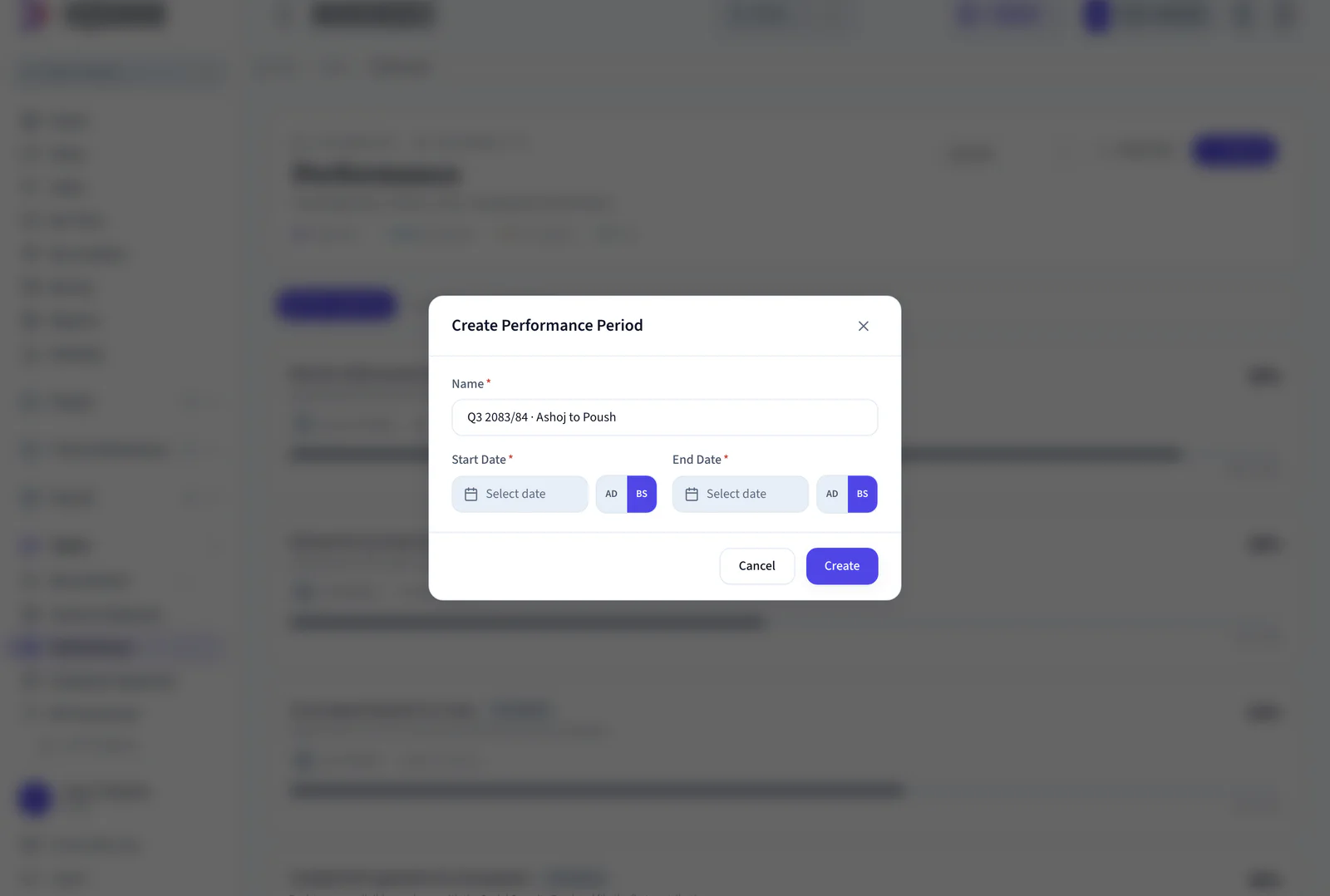
- Use + New Period for a quarter, a half or the fiscal year, so each cycle starts clean.
- With + Objective, give it a title like “Increase revenue by 20%”, a key result type, target value, due date (AD or BS) and an employee.
- Drag the slider on any objective and the bar moves with it. No export, no separate tracker.
- Objective count, average progress, average rating and 1:1s for the period stay current as the team works.
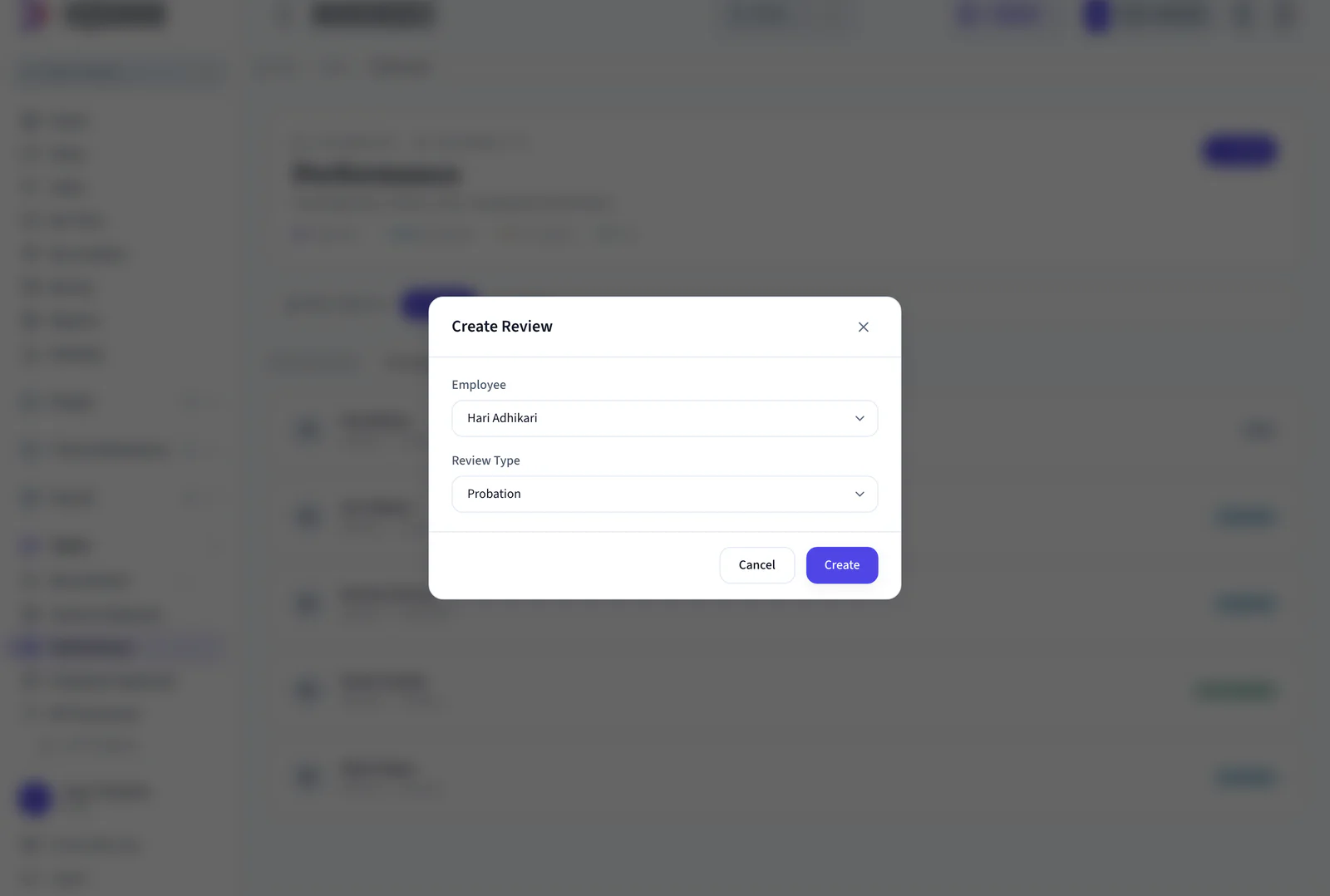
- From the Reviews tab, pick the employee and the type: quarterly, annual, probation, self-review or 360°.
- Give 1 to 5 stars with comments, then move the review through draft, submitted and acknowledged.
- + Schedule Meeting takes the employee, date and time, the meeting type (1:1, check-in, goal-setting, feedback) and an agenda.
- Scheduled time, agenda and status stay on the record, so nothing is lost between sessions.
Start the Cycle Clean
Pick the Person and the Type
One Performance System for Employees, Managers and HR
Employees understand what is expected, managers keep progress moving, and HR keeps every review and deadline on record.
For Employees
Know what's expected, see your progress
- Your objectives with targets and due dates, always visible
- Self-reviews to tell your side before the rating lands
- Acknowledge reviews, so nothing is filed without your eyes on it
For Managers
Run the rhythm without spreadsheets
- Team objectives and average progress on one screen
- 1:1s and check-ins scheduled with an agenda, not from memory
- Reviews grounded in a period of tracked progress
For HR
Every review on record, every deadline met
- Probation and intern review alerts on the dashboard
- Update any objective's progress in place, no exports
- Performance bonus points visible on the employee profile
Performance Management Built for Every Business in Nepal
From a five-person startup to a multi-branch enterprise, the rhythm is the same: clear goals, honest reviews, regular conversations.
Performance Connects Every Module
A rating is not a document that gets filed and forgotten. It sits on the employee record beside attendance, payroll and the joining date that started the probation clock.
Employee Management
Objectives, reviews and bonus points live on the employee profile, next to the reporting line they follow.
Payroll Software
Ratings and performance bonus points are right there when increments and bonuses are decided.
Onboarding & Offboarding
Probation reviews start from the joining date captured during onboarding, so confirmations never slip.
Recruitment & ATS
New hires arrive with a role and a manager already set, so their first objectives can be assigned on day one.
Activity Tracker
Hours, timelines and workload patterns give managers real context before a review conversation.
Mobile App
Update an objective from the desk, prep a 1:1 from your phone, acknowledge a review from anywhere.
Training & LMS
A development objective agreed in a review points at the course that closes it, and the completion lands back on the same record.
Performance Management is one module of the all-in-one HR software for Nepal, so an employee is created once and every module above reads the same record.
Simple, Transparent Pricing
No Hidden Fees
NepalHRM gives you enterprise-grade HR software at a price built for Nepali businesses of every size.
- All core HR modules
- Nepal payroll compliance
- PF, SSF, CIT & eTDS
- Biometric integration
- Free onboarding support
- Regular feature updates
- Multi-company support
- BS + AD calendar
Free trial available, no card required · No setup fees · Cancel anytime
Access NepalHRM from the Web, Android and iOS
Update an objective from the desk, prepare a 1:1 from your phone, and acknowledge a review from anywhere.
Frequently Asked Questions
Everything you need to know about performance management in NepalHRM before you get started.
Five: quarterly, annual, probation, self-review and 360°. Each review carries a 1 to 5 star rating and moves through draft, submitted and acknowledged statuses.
Each objective has a key result type (such as percentage), a target value, a due date in AD or BS, and an assignee, plus a progress bar. HR can drag the slider to update progress in place, and the period's average updates instantly.
Yes. Create a period with + New Period for a quarter, a half or the fiscal year. Objectives, reviews and 1:1 counts roll up per period, so each cycle starts clean.
From the Meetings tab, click + Schedule Meeting: pick the employee, date and time, the meeting type (1:1, check-in, goal-setting or feedback) and write the agenda. The meeting keeps its status until it is done.
The reviewer prepares and submits the review, and the employee can then view and acknowledge it. That keeps a clear record of when the review was shared.
Intern and probation review alerts appear on the HR dashboard, while performance records and bonus points stay visible on the employee profile alongside payroll and attendance.
Make Performance a Rhythm, Not a Year-End Event
Set your first period today. Objectives, reviews and 1:1s live in one connected HR system built for Nepali companies.
- No credit card
- Free onboarding
- Set up in one day
- Cancel anytime