Hiring That Moves as Fast as Your Best Candidate
Post jobs with openings and salary ranges, then track every candidate through hiring stages built around your process. Log calls, emails, interviews and notes in one place, and move hired candidates directly into onboarding without entering their details again.
- No credit card
- Quick set up
- Free onboarding
What is recruitment (ATS) software?
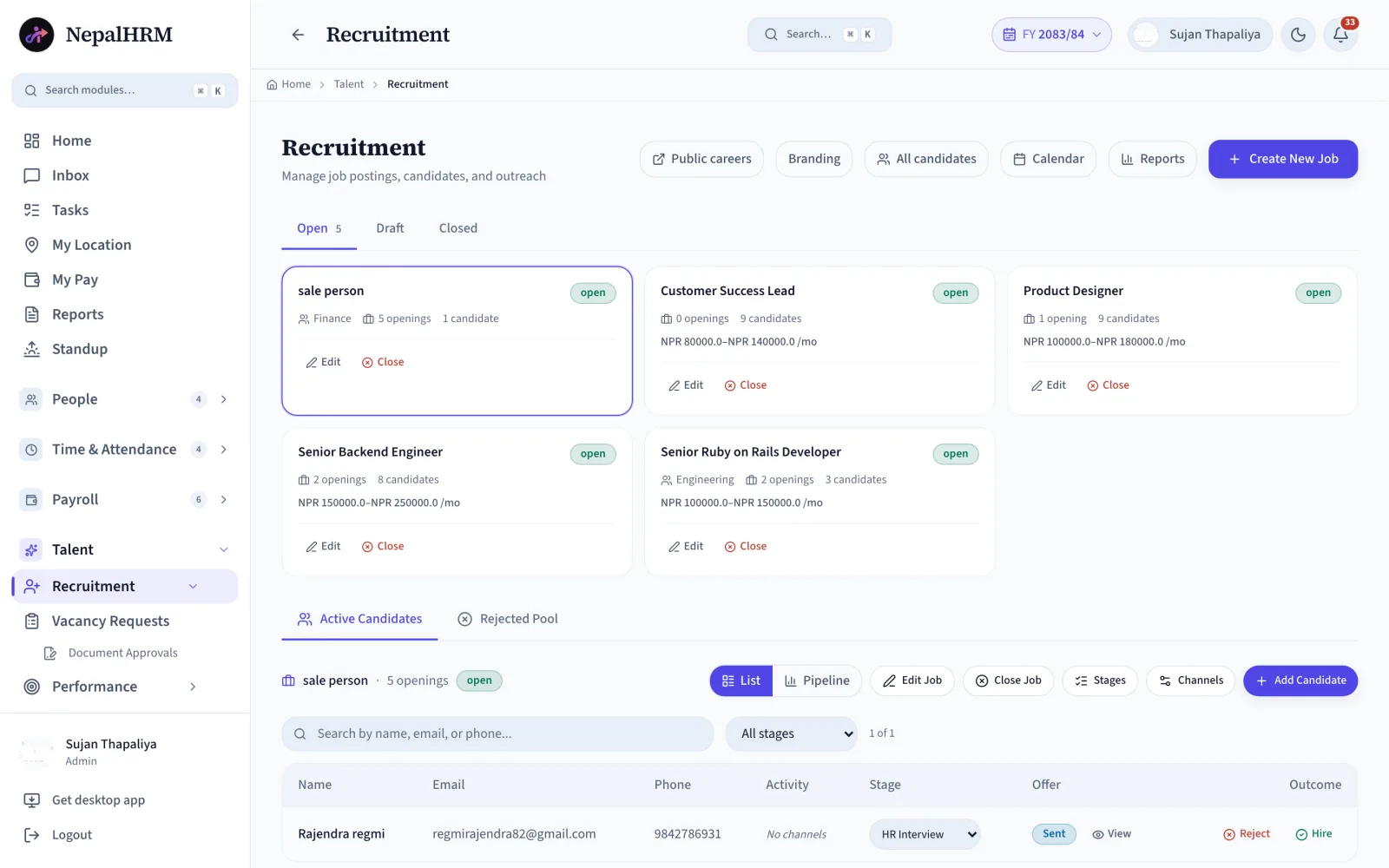
An applicant tracking system keeps every candidate for every open role in one pipeline, so a hiring decision is made from a record rather than from somebody's inbox. NepalHRM holds the job, its applicants, and the stage each one has reached, with every call, email and interview logged against the candidate. When an offer is accepted the candidate becomes an employee record, so nothing is retyped at the point where a hire turns into a joiner.
- Jobs are posted with openings, department and an NPR salary range, organised as Open, Draft or Closed.
- Stages and activity channels are set per job, because a driver and a developer are not hired the same way.
- Every candidate carries stage, activity history, offer and outcome in one table.
- Rejections are recorded with a reason and kept in a rejected pool for the next opening.
- A selected candidate moves straight into onboarding rather than starting again as a blank form.
Last updated · Reviewed by Rajendra Regmi, Co-founder
From job posting to onboarding, every step stays connected
- Create a Job
- Post a job with + Create New Job
- Per Job
- Set custom stages and activity channels
- Every Touch
- Log calls, emails and interviews
- Hire →
- Move selected candidates straight into onboarding
CVs in Inboxes, Candidates in the Dark
When hiring runs on email threads and a shared spreadsheet, good candidates slip away before you even notice.
- CVs scattered across inboxes, drives and chat forwards
- Nobody knows who called which candidate, or when
- Interviews clash because schedules live in personal calendars
- Rejected candidates vanish, so the next opening starts from zero
Every Job, Candidate and Conversation in One Place
One ATS holds the jobs, the candidates, the activity history and the outcome. Hiring becomes a process, not a scramble.
What NepalHRM gives you
- Jobs posted with openings, department and NPR salary range, organized as Open, Draft and Closed
- Every candidate tracked with stage, activity history, offer and outcome in one table
- Calls, emails, interviews and notes recorded against each candidate, with a complete activity history for the hiring team
- Hire when the offer is accepted, reject with a reason, and keep everyone in the Rejected Pool for next time
Everything From Job Post to Accepted Offer
A complete applicant tracking system, with a public careers page at one end and a direct onboarding handoff at the other.
Every candidate sits in a stage you defined
Each job runs its own stages. Add, rename, reorder or delete them from the Stages button, then move candidates forward from the row without opening a separate page.
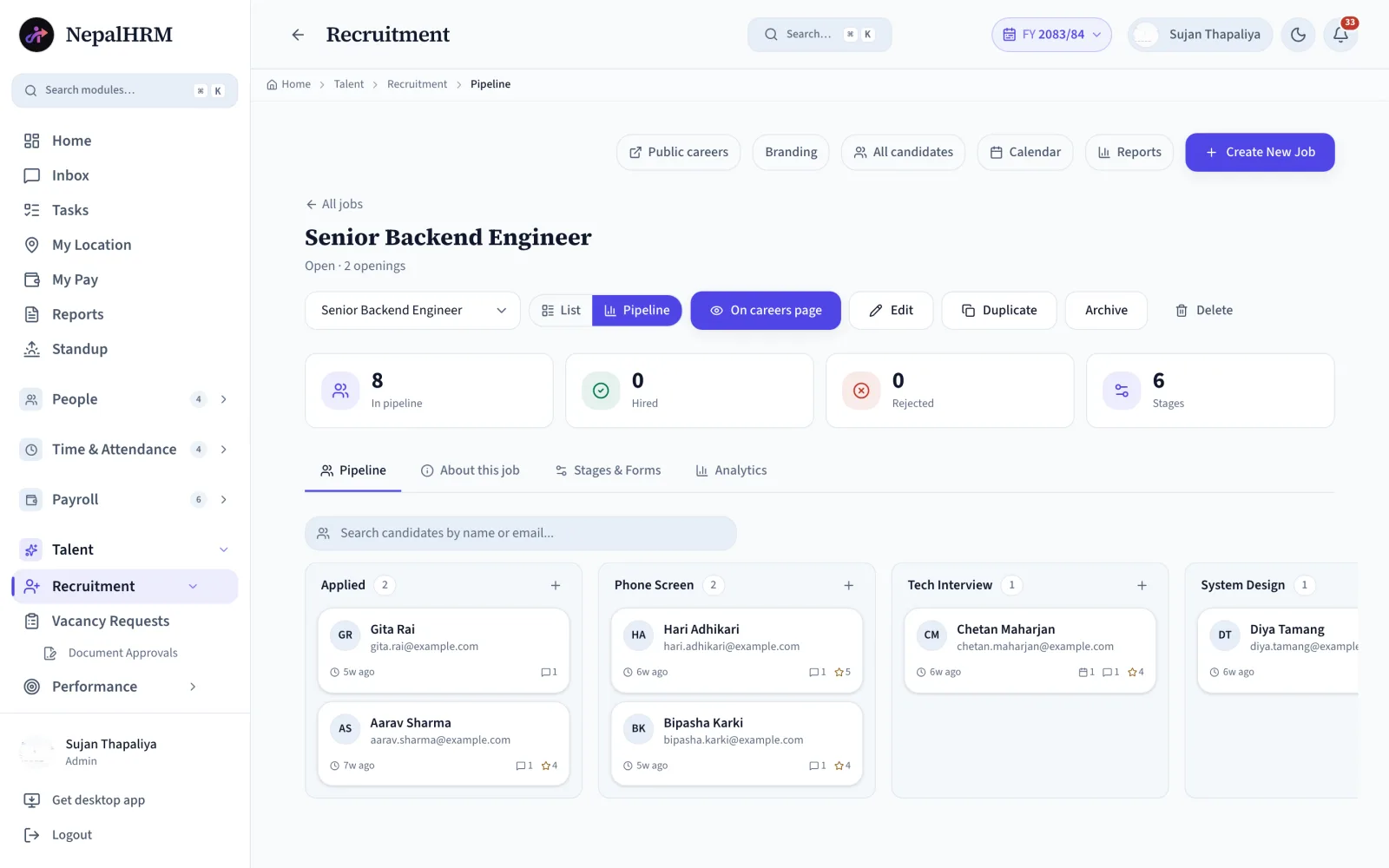
- An engineering role can run a coding round while sales runs a pitch round.
- A dropdown on the candidate row advances Screening to Interview to Offer.
- Stage counts show where the pipeline is thin before it becomes a problem.
All Features for Running Recruitment in NepalHRM
A complete applicant tracking system, with a public careers page at one end and a direct onboarding handoff at the other.
Job Posting
Create a job with title, department, openings and NPR salary range. Keep it in Draft until it's ready to open.
Inline Departments
Create a missing department with the + New button inside the job form, without leaving the page.
Public Careers Page
Open roles publish to your own branded careers page, and applicants land directly in the ATS.
Open / Draft / Closed
Jobs organized in three tabs, each card showing openings, candidate count and salary range.
Active Candidates Table
Every candidate with name, email, phone, current stage, activity, offer and outcome in one view.
Activity Channels
Log a phone call, Email, Interview or Note per candidate with one click on the channel buttons.
Custom Stages Per Job
Each job runs its own stages. Add, rename, reorder or delete them from the Stages button.
Move Candidates Between Stages
Select the next stage directly from the candidate row without opening a separate page.
Hiring Calendar
View scheduled interviews in one place so the hiring team knows what is coming next.
Hire & Reject
Click Hire when the offer is accepted, or Reject with a reason. Every outcome is recorded.
Rejected Pool
Rejected candidates stay searchable in their own tab, ready to revisit when a similar role opens.
NPR Salary Ranges
A minimum and maximum per job keeps offers consistent, whether or not you show it publicly.
From Job Post to Day One, Step by Step
Each job runs its own stages. Candidates move forward with a dropdown, and every step is visible to the whole hiring team.
- 1
Post the Job
Title, department, openings and salary range. Publish or keep as Draft.
- 2
Collect Candidates
Applicants arrive from the careers page, or add them with + Add Candidate.
- 3
Screen
Review CVs and log the first phone screen on the candidate's row.
- 4
Interview
Schedule on the hiring calendar and log notes where the next interviewer finds them.
- 5
Offer
Move the candidate to the Offer stage and prepare the offer using the approved salary range for the role.
- 6
Hire or Reject
Hire on acceptance, or Reject with a reason into the Rejected Pool.
- 7
Hand Off
Hired candidates appear in onboarding with their checklist waiting.
Day One, Ready
Desk, accounts and documents prepared before they walk in.
How to Set Up Recruitment in NepalHRM?
Two halves of the same flow: open the job and source candidates, then track every conversation to a decision.
- Click + Create New Job and type the job title. Pick a department, or create a missing one inline with the + New button, then add the openings and the NPR salary range. Publish it to your careers page or keep it as a Draft while the details settle.
- Applicants from your public careers page land in the ATS on their own. Anyone your team sources directly goes in with + Add Candidate: name, email, phone and a starting stage.
- Set the stages per job with the Stages button: add, rename, reorder or delete. Do the same for activity Channels, then click Phone, Email, Interview or Note on a candidate's row to record the conversation.
- Click Hire when the offer is accepted and the candidate flows straight into onboarding with their checklist waiting, or Reject with a reason into the Rejected Pool for the next similar opening.
One Hiring Board, Clear Duties for Everyone
HR runs the jobs, managers weigh in on their candidates, and leadership sees hiring health at a glance.
For HR & Recruiters
Run every opening from one screen
- Post jobs, manage stages and channels, log activities
- Search candidates by name, email or phone across jobs
- Revisit the Rejected Pool when a similar role opens
For Hiring Managers
Focus on candidates connected to your openings
- Full activity history before every interview
- Interviews on a shared hiring calendar, no clashes
- Interview notes logged where the next person finds them
For Leadership
Hiring health without asking around
- Open roles, openings and candidate counts at a glance
- See open roles, openings, and candidate progress in one place
- Salary ranges per role keep offers consistent
Recruitment Built for Every Business in Nepal
Whether you hire two people a year or twenty a month, NepalHRM keeps every opening organized.
Recruitment Connects Every Module
A hire is not the end of a spreadsheet. It writes the employee record, triggers onboarding and sets up the first payroll run, all from one platform.
Employee Management
A hired candidate becomes an employee record with their documents attached. Nothing is re-typed.
Onboarding Checklists
Hired candidates appear in onboarding with the desk, accounts and documents checklist already waiting.
Payroll Software
The salary agreed at the offer stage carries into the salary structure, so the first payroll run is right.
Leave & Attendance
New hires inherit the leave policy and attendance rules of their department from day one.
Mobile App
Record interview notes on the move and approve hiring decisions from Android and iOS.
Careers Page
Your branded public page shows only your open roles and pushes every applicant into the ATS.
Simple, Transparent Pricing
No Hidden Fees
NepalHRM gives you enterprise-grade HR software at a price built for Nepali businesses of every size.
- All core HR modules
- Nepal payroll compliance
- PF, SSF, CIT & eTDS
- Biometric integration
- Free onboarding support
- Regular feature updates
- Multi-company support
- BS + AD calendar
Free trial available, no card required · No setup fees · Cancel anytime
Access NepalHRM from the
Web, Android and iOS
Post jobs from your desk, record interview notes on the move, and approve hiring decisions from anywhere.
Frequently Asked Questions
Everything you need to know about NepalHRM recruitment before you get started.
Yes. Stages are defined per job: click Stages in the action bar to add, rename, reorder or delete them. An engineering role can run a coding round while a sales role runs a pitch round. Activity channels are customizable the same way.
Two ways: applicants apply through your public careers page and land in the ATS automatically, or your team adds them with + Add Candidate (name, email, phone and starting stage).
Each candidate row has channel buttons: Phone, Email, Interview, Note. Click one to log the activity. The full history stays on the candidate, so anyone can pick up where the last person left off.
Click Hire once the offer is accepted. NepalHRM creates the employee record and moves the new hire into the onboarding process without duplicate data entry.
Reject always asks for a reason, and the candidate moves to the Rejected Pool tab. When a similar role opens later, you can search the pool and re-engage instead of starting from zero.
Each job includes a minimum and maximum salary range in NPR. You can choose whether to display it on the public careers page while keeping approved salary limits visible to the hiring team.
Official Hiring & Employment Sources
Appointment terms, probation and the registrations a new hire triggers in Nepal are set by the Labour Act and the rules published under it. NepalHRM keeps the offer, the contract and the onboarding checklist configurable, so you can match the law and your own policy.
- Labour Act 2074 (2017)Employment contracts, probation & appointment terms
- Ministry of Labour, Employment & Social SecurityLabour rules, work permits & employment circulars
- Social Security Fund (SSF)Enrolling new hires in the social security scheme
- Inland Revenue Department (IRD)PAN registration & tax treatment of new employees
Recruitment is one module of the all-in-one HR software for Nepal, so a hired candidate becomes an employee record without being retyped.
Hiring terms, defined
The contract vocabulary a Nepali offer runs on, from the type of employment to the notice that ends it.
- Employment Typesरोजगारीका प्रकारNepal's Labour Act 2074 recognises five employment types: regular, work-based, time-bound, casual and part-time. The type decides how the contract can end, what entitlements apply, and what has to be in writing.
- Probation Periodपरीक्षणकालProbation is the initial period during which an employer assesses a new employee before confirming them. Nepal's Labour Act 2074 caps it at six months, after which the employee is confirmed or the engagement ends.
- Notice Periodसूचना अवधिA notice period is the time between notifying the other party that employment will end and the last working day. In Nepal the requirement depends on the ground for ending the engagement and on what the contract says.
- Applicant Tracking System (ATS)An applicant tracking system is software that manages hiring from job posting to offer: applications in one place, candidates moving through defined stages, and a record of who decided what.
All HR and payroll terms used in Nepal are defined in the glossary, each with the Act or rate it comes from.
Stop Losing Good Candidates to a Messy Inbox
Post your next opening in NepalHRM and run every candidate, conversation and offer from one connected HR system built for Nepali companies.
- No credit card
- Free onboarding
- Quick set up
- Cancel anytime